
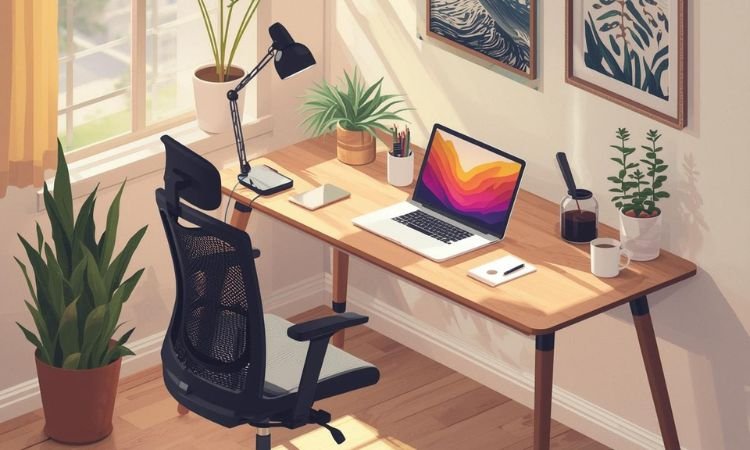
A good desk setup isn’t about expensive gear—it’s about positioning your screen, keyboard, and tools so you can work comfortably for hours without strain.
Most home offices use desks 48″–60″ wide, but even a small corner can function well with smart ergonomics and intentional layout. The goal is to reduce eye fatigue, prevent back pain, and keep distractions off your surface.
Forget “Instagrammable” setups with neon lights and ten monitors. These 10 ideas focus on proven ergonomics, natural light, and clutter-free zones that support actual work—not just aesthetics. Whether you’re in a closet office or a dedicated room, the right setup helps you stay focused longer and feel better at the end of the day.
Why Your Setup Affects More Than Just Looks
Screen height prevents neck strain: Top of monitor should be at or slightly below eye level.
Keyboard position protects wrists: Elbows at 90°, wrists straight, no reaching.
Natural light boosts alertness: Position desk perpendicular to windows to reduce glare.
Clear surface = fewer distractions: Every extra item competes for attention.
10 Work Desk Setup Ideas That Support Focus, Posture, and Real-World Workflow
All concepts work on standard desks (48″–60″ wide) and assume daily computer use.
1. Monitor at Eye Level with Laptop Stand
Place your laptop or external monitor so the top third of the screen aligns with your natural eye line when sitting upright.
Use a sturdy stand or stack of books under a laptop, and connect an external keyboard and mouse to maintain proper wrist posture.
2. Desk Perpendicular to Window for Even Light
Position your desk so the window is to your left or right—not in front or behind—to avoid screen glare and harsh shadows.
This setup provides consistent natural light without forcing you to squint or constantly adjust blinds during video calls.
3. External Keyboard and Mouse on Same Plane
Keep your keyboard and mouse on the same flat surface, close enough that your elbows stay bent at 90° and shoulders relaxed.
Avoid trays that tilt downward; a neutral wrist position reduces long-term strain and improves typing comfort.
4. Chair with Lumbar Support and Adjustable Height
Use an office chair that lets you adjust seat height, armrests, and lumbar support so your feet rest flat and your lower back is supported.
If using a dining chair, add a small cushion behind your lower back and place a footrest under your feet if they don’t touch the floor.
5. Single Task Lamp on Opposite Side of Writing Hand
Place a warm-white (2700K–3000K) LED desk lamp on the side opposite your dominant hand to reduce shadows while writing or reading.
Choose an adjustable-arm lamp so you can direct light exactly where needed without shining into your eyes or camera.
6. Minimal Surface: Only Screen, Keyboard, Notebook
Keep only three things on your desk during work: your screen, keyboard/mouse, and one open notebook or notepad.
Store pens, phones, and chargers in drawers or wall-mounted holders—out of sight but within reach—to reduce visual noise.
7. Dual Monitor Setup with Centered Primary Screen
If using two monitors, place the primary screen directly in front of you and angle the secondary slightly inward toward your line of sight.
Match screen heights and resolutions to avoid constant refocusing, and use monitor arms to free up desk space and adjust positioning easily.
8. Footrest for Proper Leg Support
Use a flat or slightly angled footrest if your chair leaves your feet dangling or if you sit cross-legged often.
Keeping knees level with or slightly below hips improves circulation and reduces lower back pressure during long sessions.
9. Cable Management Under Desk
Route power cords, USB cables, and charging lines through adhesive clips or under-desk trays to keep them off the floor and out of view.
Label each cable with a small tag or colored wrap so you can unplug the right one without tracing it from the wall.
10. Dedicated “Do Not Disturb” Signal
Place a small object—a red notebook, a turned sign, or a specific lamp—on your desk to signal to household members that you’re in deep work mode.
Pair it with a rule: no interruptions unless urgent. This simple cue builds boundaries without words.
Common Mistakes and Fixes
- Laptop used without external peripherals
Fix: Always pair a laptop with an external keyboard and mouse to avoid hunching and wrist strain. - Desk facing a wall all day
Fix: If possible, position your desk to see a window or doorway. Visual breaks reduce mental fatigue. - Over-lighting with cool-white LEDs
Fix: Use warm-white bulbs (2700K–3000K). Cool light (4000K+) feels clinical and disrupts circadian rhythm. - Ignoring seated posture
Fix: Set a phone reminder to check posture every hour: shoulders down, back supported, feet flat. - Letting printers or scanners live on the desk
Fix: Move them to a side cart or shelf. They’re used occasionally but dominate valuable surface area.
Build a Setup That Works for You—Not the Camera
The best desk setup disappears while you work. It doesn’t draw attention—it supports you quietly, hour after hour. Start with screen height and chair fit. Add lighting and cable control only as needed.
What’s one thing you’d change about your current setup? Have you tried a monitor stand, footrest, or perpendicular window placement?
Share your experience in the comments—we’d love to hear how you’ve made your workspace truly work for you.