
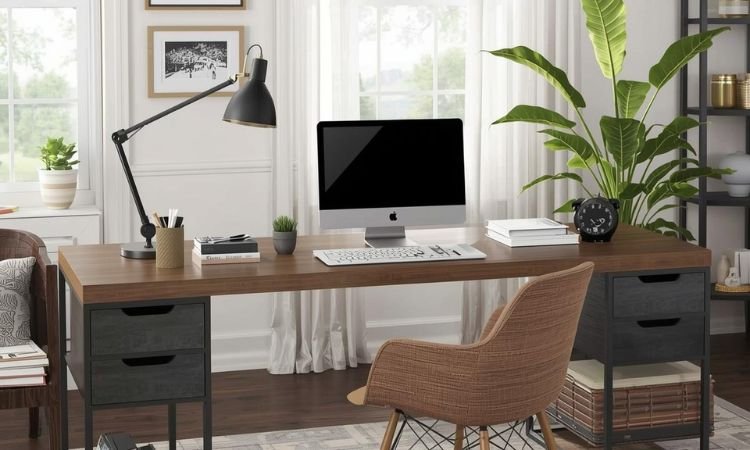
vA well-organized desk isn’t about matching trays or perfect symmetry—it’s about making your most-used tools easy to reach and everything else disappear.
Most home offices use desks between 48″ and 60″ wide, yet quickly fill with cords, notebooks, and half-empty coffee cups. The goal is functional calm: a surface clear enough to think, with storage that works without demanding attention.
Forget aesthetic-only organizers that look great but collect dust. These 11 ideas focus on real-world habits: cable management that stays hidden, vertical space that replaces drawer chaos, and zones that support actual work—not just photos of “clean desks.”
Why Practical Organization Matters
Clear surface = clearer mind: Studies show visual clutter increases cognitive load—even if you’re used to it.
Vertical space is underused: Walls and monitor backs hold more than you think.
Cables are the #1 clutter source: Taming them eliminates 80% of desk mess.
Everything should have a home: If it doesn’t, it becomes visual noise.
11 Work Desk Organization Ideas That Reduce Clutter and Boost Daily Focus
All concepts work on standard desks (48″–60″ wide) and assume daily computer-based work.
1. Monitor Stand with Hidden Storage
Place your monitor on a raised stand with a shallow shelf underneath for notebooks, a notepad, or wireless charger.
This lifts screen to eye level while creating instant storage for flat, frequently used items—no digging through drawers needed.
2. Under-Desk Cable Management Tray
Mount a slim plastic or metal tray beneath the desk to hold power strips, adapters, and excess cord length out of sight.
Use hook-and-loop straps to bundle cables by device, so unplugging one doesn’t unravel the whole system.
3. Wall-Mounted Pegboard Above Desk
Install a 24″x36″ pegboard directly above your workspace to hold headphones, scissors, pens, and small baskets using hooks and bins.
Keep only daily-use items within arm’s reach; store seasonal or backup supplies elsewhere to avoid visual buildup.
4. Drawer Dividers for Supplies
Use adjustable felt or acrylic dividers inside desk drawers to separate pens, paper clips, USB drives, and batteries into labeled zones.
Prevent “junk drawer” syndrome by assigning one category per section and purging unused items monthly.
5. Desktop Document Tray (In/Out)
Place a two-tier letter-size tray on the left or right side of your desk for incoming mail, printed drafts, or forms needing action.
Empty the “in” tray daily and file or discard everything in the “out” tray weekly to prevent paper pileup.
6. Monitor-Mounted Paper Clip or Sticky Note Holder
Attach a small magnetic or adhesive clip to the side of your monitor to hold sticky notes, reminders, or a single sheet of reference info.
This keeps critical info visible without covering your screen or taking up desk surface area.
7. Wireless Charging Pad Built Into Desk
Integrate a Qi-certified wireless charging pad into the desk surface or use a slim mat that doubles as a mouse pad.
Charge your phone or earbuds without cords dangling over the edge—just set down and power up.
8. Vertical Magazine Files for Active Projects
Stand three slim magazine files on the desk edge to hold current project folders, client docs, or reading material.
Label each clearly and limit to active work only—archive completed projects to shelves or filing cabinets weekly.
9. Cord Wrap Labels for Every Device
Use reusable silicone or fabric wraps labeled with device names (e.g., “Laptop,” “Phone,” “Tablet”) to keep charging cables tangle-free.
Store them in a small bin or hang them on a pegboard hook so you never grab the wrong cord again.
10. Desk-Side Rolling Cart for Supplies
Place a narrow 3-tier rolling cart (12″ W x 16″ D) beside your desk to hold printer paper, extra ink, notebooks, and backup tech.
Roll it away when not in use to open floor space, or tuck it under an L-shaped desk for compact access.
11. “End-of-Day Reset” Routine
Spend 3 minutes at the end of each workday clearing coffee cups, filing papers, coiling loose cords, and wiping the surface.
A clean desk each morning reduces decision fatigue and creates a mental reset before starting fresh.
Common Mistakes and Fixes
- Over-organizing with too many bins
Fix: Use only what you touch daily. If a tray stays empty for a week, remove it. - Ignoring cable types
Fix: Separate power cords from data cables. Use braided sleeves for charging lines, Velcro for Ethernet. - Letting printers live on the desk
Fix: Move printers to a side cart or shelf. They’re rarely used hourly but dominate surface space. - Storing everything in drawers
Fix: Keep only backups in drawers. Daily tools belong on walls, monitors, or shallow trays—within sight and reach. - Skipping a paper system
Fix: Even digital workers get mail. Use one in-tray and process it daily—don’t let it become a monument.
Organize for Work, Not for Photos
A functional desk supports your rhythm—not a Pinterest ideal. Keep only what earns its place through daily use. Store the rest. Clear space isn’t empty; it’s ready.
What’s your biggest desk clutter challenge—cables, paper, or random tech? Have you tried pegboards, monitor stands, or rolling carts?
Share your best tip (or worst habit) in the comments—we’d love to hear how you keep your workspace truly workable.